Showing posts with label Universal Binary. Show all posts

Wednesday, August 26, 2009

Xslimmer 1.7 now available, fully compatible with Snow Leopard

Xslimmer 1.7 has just been released! It supports 64-bit binaries, honors code signing rules, is able to handle and create native HFS-compressed files and adds many other improvements that will continue to provide a worthwhile and reliable experience to Snow Leopard users (as well as to all others that choose not to upgrade to the latest OS yet). Read on for the gory details!

Universal Binaries are so 2008, aren't they?


Well, unfortunately they are not. Or, should we say, fortunately they are not. Universal Binaries were a key technology that allowed Apple to transition from PowerPC to Intel CPUs in the most awesomely flawless technology adoption ever. The same Universal (or, as they are affectionately called, "fat") Binaries are being put to work again to ensure that Snow Leopard and its apps run flawlessly in all compatible Intel machines, including 32-bit and 64-bit ones.

So instead of packaging binaries in a bundle that contains PowerPC and Intel versions of the code, it will now become usual for developers to provide the 32-bit and the 64-bit versions of the same code. The 64-bit version will be used in 64-bit computers, whereas the 32-bit code will run in CPUs that are not able to handle 64 bits. There is no magic way for the system to transform one into the other, so no matter what computer you have, chances are many of the apps you install will contain code that will be ignored and never will run.

But it gets more interesting! Snow Leopard is truly awesome, but there is no reason for developers not to support Leopard if they can. True, some apps will take advantage of Snow Leopard exclusive technologies such as Grand Central Dispatch, OpenCL or some other new APIs; however, many others won't need these innovations yet and will still support Leopard. But Leopard does run on PowerPC machines, so developers should include a PowerPC version of the code if they want to support the same hardware requirements as the OS. As a result, we are starting to see applications that include not two, but three architectures: Intel 32, Intel 64 and PowerPC. This is the case for some very popular apps such as Tweetie for Mac or the latest version of Apple's own Airport Utility.

Xslimmer was designed to handle these situations, and it has now been tested and optimized for the scenarios above so it will always keep the best version of the code that is available for your Mac. If you own a 64-bit-ready Mac, then Xslimmer will preserve the 64-bit version of your applications' code - when it's available.

Won't Xslimmer break 64-bit applications? What about code-signing?


As discussed above, Xslimmer carefully analyzes your applications and selects the best possible architecture among those available. This is done in a per-application basis, and not following some batch process that blindly keeps a single combination. Analysis includes evaluation of signed resources: code-signing rules are fully honored so that only binaries that can be safely modified will be processed.

Extreme care is applied when slimming, and the operation is performed in the most friendly way. Your slimmed applications are registered again for you in the internal OS databases - your keychain authorizations are preserved, and you don't even need to restart your Mac after slimming it.

But Apple applications are already compressed!


Snow Leopard achieves significant space savings by using transparent file system compression. In fact, all system applications and utilities are installed in a compressed state, although they are transparently uncompressed on the fly without the user ever noticing. Xslimmer 1.7 recognizes and supports this type of compression: if a compressed application is slimmed, then it will be recompressed automatically. Therefore, all system applications in Snow Leopard will still benefit from additional space savings if they are slimmed, without affecting their compression status.

When running on Snow Leopard, Xslimmer will always show you the actual size your applications take up in your disk, and not the uncompressed size as reported by Finder and other tools. This way you can be absolutely sure about the savings you achieve.

We have even taken this technology a step forward. A new option in Xslimmer 1.7 will allow you to compress slimmed binaries that were not originally compressed. This way, your installed third party apps can also benefit from this awesome new HFS+ compression technology in Snow Leopard.

Ok, I'm sold - I'll give it a try!


Wonderful! We've always worked hard to prove that your choice of Xslimmer is really the best option for your slimming needs. In Xslimmer 1.7 you'll find many features designed to slim your Mac easily and with total peace of mind. These include:
Strip out unneeded localizations - As usual, Xslimmer 1.7 will remove translations you don't need, achieving great space savings.

Visual indication of architectures - Another new feature in Xslimmer 1.7, you can now see what architectures an app contains and what the resulting architecture is: Intel 32, Intel 64, PowerPC 32 or PowerPC 64.

Downloadable blacklist - for those apps that check themselves (for anti-piracy reasons, usually) and refuse to start after they have been slimmed. We test every report from other users about malfunctioning apps.

Your personal exclusion list - for folders in your disk that you don't ever want to mess with, for whatever reason.

Integrated backups - designed to let you test your slimmed apps with the confidence that you'll be able to recover them in one click.

Extreme compatibility - Xslimmer 1.7 has been fully optimized for Snow Leopard, but it will still run in Panther, Tiger and Leopard.


So, no matter whether you are a longtime Xslimmer fan or have come across it recently, now is an excellent time to check the combined space savings that Snow Leopard and Xslimmer will bring. We hope you like Xslimmer 1.7!

Saturday, February 02, 2008

Xslimmer 1.5 is Out!

It has taken us more than expected, but Xslimmer 1.5 is finally out.

Initially we intended to release this version along with Leopard, but we changed our strategy along the way. Feedback received from our testers and some difficulties in getting localizations recommended to dedicate some more time to this version. At the same time, we did not want to delay full Leopard compatibility, so we decided to add Leopard functionalities (code signing support, time machine exclusion, and others) to the 1.2 development line, while continuing to work on 1.5 at the same time.

Shortly after our initial Leopard-compatibility release we started to work on the preparation of the Christmas promotions we chose to take part in: MacUpdate bundle, and MacHeist II (as a loot for Mission 4). They both have been a success, and we have managed to get Xslimmer into the hands of many more customers.

The wait is now over. Thanks very much to all testers and to all our customers for your patience. We hope you enjoy this release, and that you see a lot of your suggestions covered by it.

Saturday, October 27, 2007

Xslimmer and Leopard

We are getting a good number of enquiries about Xslimmer's current version with Leopard. As far as we now, it should work fine: we have tested it out with all developer betas and it did.

Developers did not get the Leopard final build before the general public, so we are now in the process to test it thoroughly with the commercial release to see if there are any new issues we should cope with, although they are not anticipated so far.

On the other hand, apps in Leopard may contain additional architectures with 64-bit versions of the binaries in addition to the usual 32-bit versions. We are now beta testing a new Xslimmer release that is optimized for this situation. Hopefully, it will be released in a few days.

Monday, April 02, 2007

Want to try Xslimmer 1.2.3 Beta ?

Xslimmer 1.2.3 is finished. Quite a few things have changed from the previous version:
  • Column headers, sorting. The application list now features column headers, allowing you to sort the applications by the criteria of your preference
  • Additional application information through drawer. Using the "Info" icon of the toolbar you can get a side drawer that adds information on the application, and offers a couple of actions: exclude and slim.
  • Single application slim. You can use the drawer or the secondary click on an app to slim that app alone.
  • App exclusion is now accessible through toolbar, secondary click menu and drawer
  • Progress bars and several icons design has been updated
  • 3 new localizations have been added: Japanese, Dutch, Swedish (not complete yet)
  • Delete, Backspace keys now eliminate applications from the list
  • History is now resorted after slim has finished, maintaining the selected criteria
  • History and backup purging are no longer active by default

So, we want volunteers to test it for a few days before launching it. Please remember, it is beta software. Should you detect any issues, please contact us!

Xslimmer 1.2.3b2 can be downloaded here.

Tuesday, March 06, 2007

Back...after the break

As with every major release of an application, not only the days prior to the release are very intensive, but also the days after. With Xslimmer 1.2 it has not been different. Issues, doubts, questions, bugs, feedback. Lots of hours of dedication and little sleep.

The most important bug was what I initially called the "UK English Bug", which at the end also had an important impact on our German customers. After a few hours of being detected, we released 1.2.1 in order to fix it. Incredibly, none of our beta testers were German or UK English people. We apologize to those who suffered this issue.

A few days later, with 1.2.2 we fix some other minor fixes and tweaks were introduced. Then, we took a break. For a few days, we had enough with our day jobs and our families.

Right now we are back, and starting with 1.2.3 and our general Xslimmer roadmap. We shall keep you posted.

Wednesday, February 14, 2007

Xslimmer 1.2 is Out!

That's right. The anticipated release of Xslimmer that allows language stripping from applications is here. In this release, we include a series of benefits:

* Language stripping. Xslimmer 1.2 allows you to easily select how many languages you want to preserve and will remove the rest, thus greatly increasing the amount of disk space you'll free.
* Send apps to exclusion list. A new menu option allows you to easily add applications to your personal list of excluded ones, directly from the Xslimmer window. No more search for the app to exclude!
* Quicksilver integration. Allows Xslimmer to become a target for Quicksilver's "Open with..." feature.
* Localizations. Xslimmer is now available in English, Spanish, French and Italian!
* UI improvements. A variety of minor UI improvements have been added that contribute to (we hope) a sound, consistent and polished user experience.

Hope you enjoy using Xslimmer 1.2.

Tuesday, January 23, 2007

New Version Design

We have finished the version 1.1.x roadmap. It is time to move on to 1.2. As you probably know, 1.2 shall include app language stripping capabilities. This means that many parts of the Xslimmer app will have to be adapted or even rewritten.

The most obvious change will be the main window. How do we indicate that an app has multiple languages? should we show what the final language will be? what happens after the language stripping has been done? But, most importantly, how do we combine both features into one single application and make sure that it is still attractive and easy to use?

Then you have the history or log information. The operation needs to be reflected in there, and in a compatible way with the current existing slim log.

Blacklist. Does it need to change? Will apps behave in equal manner when stripped from languages than when stripped from architectures? There is some testing to do.

These and many more details, are our current thoughts on making 1.2. It will take a few weeks, and a new beta test to get it out, but, as we are in the design phase this week, it would be great to hear any ideas you might want to see included in this or other future versions.

Saturday, January 13, 2007

MacWorld Ends While We Release

After a week in which all attention was concentrated in San Francisco, things start to get back to normal. Hopefully, next year we will be able to participate. I am really looking forward to that, and, by that time, the iPhone should already be available.

Meanwhile, we did release Xslimmer 1.1.7. It would be great to hear opinions on the GUI changes. We were concerned that making the drop window disappear, making the main window the drop area, would not be something our user would like. We believe this change simplifies usage of the application, while it provides us with the flexibility to include new features in an easier way.

Saturday, December 30, 2006

Xslimmer in Pomcast.com

Two days ago we had an interview with Stuff MC, from Pomcast.com, for the Spanish version of the podcast. During the interview, we comment on the creation process of Xslimmer, future possibilities and we talk about the Apple world in general. If you are interesed, you can check it out here.


There will be an English version in the future. Until then, we wish you a very happy new year.

Monday, December 25, 2006

Season Greetings

The last 2 months have been very intensive. We launched the first public beta of Xslimmer on November 1st. Since then until now, we have had several different releases, 10 in beta, 6 non-beta. Beta releases were mostly oriented to issue resolution, while non-beta have been dedicated to adding new features to the product. Today, in addition to what was included in the very first version, Xslimmer includes:

* Dock-drop feature
* History log window
* Restore function
* Report function
* Growl support
* Direct Slim feature
* Revamped Preferences
* Improved Window animations and transitions
* Other UI improvements
* Many performance improvements
* Panther compatibility

We continue with our roadmap, which includes quite a good number of additional features, and some major new functionalities, like the ability to strip languages.

This is not all. During this period, we have executed 3 different marketing actions. We started with the GiftZOT bundle (at MacZOT), then a MacAppADay one-day feature and the AppZapper/Xslimmer Christmas bundle.

Hundreds of emails, many hours dedicated to the website, particularly its backend and much, much more. Seeing the results, it clearly has been worth it. Pedro and myself would like to thank you all for the support and feedback you have provided us.

We hope you enjoy a very happy Christmas and a great new year.

Sunday, December 17, 2006

Making History

Making Xslimmer's history functionality took a little bit more than what was initially scheduled. The basic reason was that new ideas kept coming while we were designing its window. From these new ideas, we implemented the possibility to restore a backed up application and the possibility to report issues with applications slimmed.

Additionally, we took a while to design the window. In its initial conception, the history window had only text, and too much information. Little by little we transformed it into something like this:


While this image was pretty close to the final version of the window, there were still many little details to take care of. First, the color buttons. These did not look completely right to the eye. In addition, they did not behave too well while one of the apps was selected. Second, the sorting buttons in the segmented button were not showing correctly. Third, I had made it so that when an application was restoring, its restore button would show a spin progress indicator, so the window did not really need one. Finally, the window was in need of some gradient.

As a result, we kept working, and the window was almost ready a few days later:


Still solving the segmented buttons bug in Cocoa was going to take quite some code. Louie commented: "I know how to solve that bug: get rid of the buttons, and make the table headers the sort buttons". That is what finally went into 1.1.4:


So, tell us what you think!

Saturday, December 02, 2006

Marketing

These last few days have been a bit different. Initially, we had plan to work on getting 1.1.3 out by today. In 1.1.3, we intend to include a "Slim History" window that will allow you to review all the applications you have slimmed, your overall savings over time and the possibility to recover an application from its backup, if you did had the backup option turned on during the slim process. In addition, from the Slim History window you will be able to report any problematic application in an easy way to us.

While I worked on the Slim History, Pedro was working on Panther compatibility. We believe that being Panther compatible, will Xslimmer useful for a much wider audience. It is tricky though. First, we are using Intel machines for our development, so we have had to buy a PPC machine in order to work on this. This machine will allow us to ensure that we get to that desired Mac OS X 10.3.9 compatibility, and will also permit to better test our releases in the PPC platform. Second, Panther does not have some of the fine 10.4 methods, so some parts of the code are being rewritten.

During the last week though, we have been busy in getting people to know that Xslimmer exists. We contacted Brian Ball some time ago to promote Xslimmer via MacZOT. When he got back to us, he suggested to include Xslimmer within the GiftZOT 1.0 bundle. After the mystery bundle was unveiled, our Web site traffic increased significantly. Clearly, it is a signal that tell us that Xslimmer is starting to get known. Right now, we are planning another couple of marketing actions, that will happen within the next 2 months.

Right now, I am going back to work on Xslimmer's 1.1.3 Slim History.

Sunday, November 26, 2006

Xslimmer 1.1.2 has been released

After the release of the first non-beta of Xslimmer we have been quite busy. Lots of emails with questions, suggestions, and so on. Now we are back with our implementation roadmap, and today we have released version 1.1.2.

In this new version you will find the dock-drop feature: applications can now be dropped to Xslimmer's dock icon, making it even easier to slim them down. Apps can also be dropped on the application icon. This was requested by several people since the application was made known. In addition, we had still to optimize one heavy-duty loop. This optimization has also made it into this release, along with an optimization into checking applications dropped against the blacklist. Finally, we introduce some changes into de animation between windows that should make them smoother, particularly in PowerPC systems.

And now, to work on 1.1.3. Take care.

Saturday, November 18, 2006

Xslimmer is Out!

That is right! We got there. After 20 days of public beta, we are ready to launch commercially. From this moment, you can buy a license of Xslimmer, and, for a limited time only, is just $6.95.

Thanks go to all people who have helped us during the testing period.

Monday, November 13, 2006

1.0.8.RC2 is out. 1.1 Coming soon!

We have a new version of Xslimmer out. Unless we get any last minute surprises, it will be the last beta version. Next Saturday night, the night of the 18th to the 19th of November, Xslimmer 1.1 will be launched.

This will be the first commercial version of Xslimmer. To support our launch we are planning different marketing actions. First of all, we will have, for a limited time, an special introductory offer. For this period of time, a full license of Xslimmer will cost only $6.95. In addition, we are also planning different limited time offers whose deals are being worked upon with different Mac sites. You probably know who they are. If you want to suggest to us any special action, you are more than welcome.

Getting there, at last!

Tuesday, November 07, 2006

Xslimmer 1.0.7.RC2

We have released a new version of Xslimmer, 1.0.7.RC2. With the previous release, 1.0.6.RC1 we believe to have achieved significant application stability. The new release will build upon that, featuring:

- Speed boost: 3x app analysis speed after drag.
- Reduced memory consumption: Previously, applications with a significant amount of files could take up several megabytes of memory. Due to this, dropping a significant amount of apps onto Xslimmer could end up filling up the system's memory, forcing the Mac to paginate, thus becoming very slow. In 1.0.7 each application will take only a few kilobytes. I tested it with 240+ apps, and memory consumption did not even increase by 1 megabyte.
- Centralized application blacklisting: New system to prevent slimming applications that fail to behave correctly after slimming due to integrity checks. This new system will differ from the current protected applications scheme. The protected application scheme will be for you to voluntarily protect whichever app or path you want to protect. The blacklist system will be able to gather the latest information from the Internet, and protect apps known to fail.
- Projected application size: You can see how much space you will save before actually slimming.
- Slight GUI modifications.

As these changes are pretty significant, version 1.0.7 is now our second release candidate, or RC2.

Stay tuned.

Friday, November 03, 2006

Comments on Glenn Wolsey's Review

As far as we know, Glenn Wolsey has been the first site to provide a mini review of the Xslimmer application. Thank you for that, Glenn!

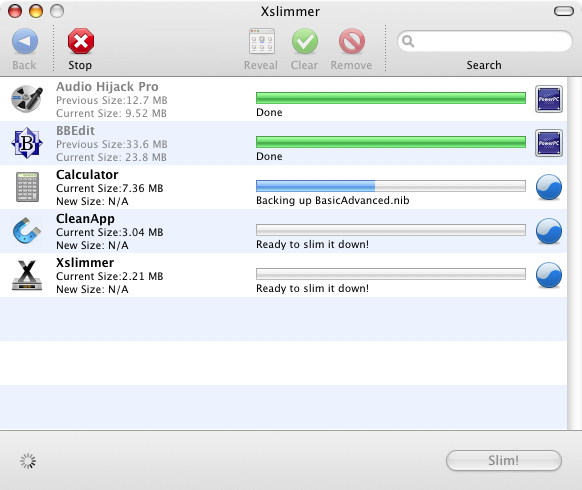
The small review seems to have caused some confusion as Glenn asumes it is for Intel Macs only. Probably the selected screenshot has caused this. Here is a PowerPC one:


So, to clarify: Xslimmer works both for Intel and PowerPC Macs. If you have a PowerPC Mac, the part that gets eliminated from the slimmed apps is the Intel one. That is why Xslimmer is a universal app. You can use Xslimmer to slim it self if you want to. To check what processor architecture Xslimmer has detected you open the about window:


In addition, as it is not mentioned, I want to point out that Xslimmer has a feature by which you can drop apps from a mounted image (.dmg). It will install the application for you and then, pressing slim, you can slim it right away. Thanks to this you can save an step in installing new apps you want to slim.

Tuesday, October 31, 2006

Public Beta is Out!

Xslimmer public beta has started! Please download your copy and tell us what you think and if you encounter any issues. We are really willing to hear your opinion about the application we have been developing for the last few months.

Wednesday, October 25, 2006

Private Beta Is Out

We have delivered the first beta to a few selected people. We are very excited and willing to hear their comments. Hopefully nothing major will come out, so we should start the public beta period next weekend.